
Little Nightmares 3 Friend Pass Not Working? Complete Fix Guide
Having trouble playing with friends in Little Nightmares 3? Discover why the Friend Pass isn't working and how to fix it with our comprehensive troubleshooting guide.
Why Little Nightmares 3 Friend Pass Keeps Failing
Many players are experiencing issues with the Little Nightmares 3 Friend Pass feature, preventing them from enjoying the co-op experience with friends. The problem typically stems from platform limitations, incorrect game versions, or technical bugs that require specific solutions.
Common Little Nightmares 3 Friend Pass Issues and Solutions
Cross-Platform Limitations
Little Nightmares 3 doesn't support cross-platform play. If you're on PC and your friend plays on Switch or other consoles, the Friend Pass won't work.
Wrong Game Version Installed
Your friend must have the specific "Free Trial & Friend's Pass" version installed, not the regular demo or family-shared copy.
PC Steam Bug Issues
Steam users report specific bugs preventing Friend Pass functionality. The developers are actively working on fixes for these platform-specific issues.
Little Nightmares 3 Friend Pass Error Demonstration
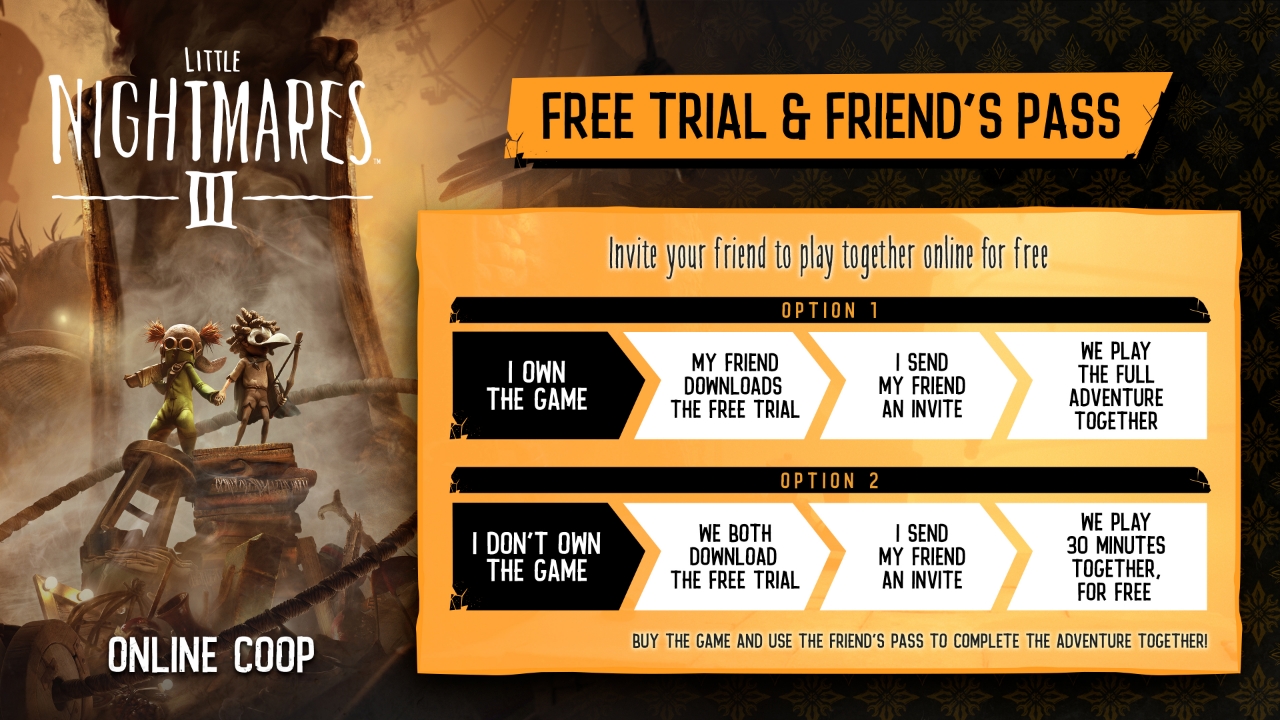
Example of common Friend Pass connection errors in Little Nightmares 3
How to Fix Little Nightmares 3 Friend Pass Not Working
Verify Platform Compatibility
Ensure both players are on the same gaming platform. Little Nightmares 3 requires players to be on identical platforms (PC-PC, PlayStation-PlayStation, etc.).
Platform Check Steps:
- Confirm both players have the game on the same console family
- Check that platform services (PSN, Xbox Live, Steam) are operational
- Verify both accounts have active online subscriptions if required
Install Correct Friend Pass Version
The friend without the full game must download the specific "Free Trial & Friend's Pass" version, not the standard demo.
PlayStation & Xbox Solution
- Navigate to Little Nightmares 3 store page
- Click the three dots next to "Purchase" button
- Select "Free Trial & Friend's Pass" option
- Download and install this specific version
PC Steam Solution
- Search for "Little Nightmares 3 Friend Pass" in Steam
- Ensure it's labeled "Free Trial & Friend's Pass"
- Avoid demo or family-shared versions
- Install the correct version completely
Proper Invitation Process
Sending invitations correctly is crucial for the Friend Pass to work in Little Nightmares 3.
Correct Invitation Steps:
- Full game owner should launch the game first
- Use the in-game online invite system, not "Shared Story" initially
- Wait for friend to accept invitation through their platform
- Ensure both players are logged into their respective accounts
Update and Maintenance Check
Outdated game versions or platform software can cause Friend Pass failures.
Update Game Version
Check for Little Nightmares 3 updates in your platform's store or library section.
Platform Updates
Ensure your console or Steam client is updated to the latest version.
Advanced Little Nightmares 3 Friend Pass Troubleshooting
When Basic Fixes Don't Work
PC Steam-Specific Issues
Some Steam users encounter persistent bugs. Try verifying game files through Steam properties, checking firewall settings, or temporarily disabling antivirus software.
Network and Connection Problems
Ensure both players have stable internet connections, open NAT types, and that necessary ports for your platform are forwarded on your router.
Report to Bandai Namco
If all else fails, report the issue to Bandai Namco support with detailed information about your platform, error messages, and steps you've already tried.
Little Nightmares 3 Friend Pass Setup Tutorial
Little Nightmares 3 Friend Pass Frequently Asked Questions
Can I use Little Nightmares 3 Friend Pass cross-platform?
No, Little Nightmares 3 does not support cross-platform play for the Friend Pass feature. Both players must be on the same platform (PC, PlayStation, Xbox, or Switch).
What's the difference between the demo and Friend Pass version?
The "Free Trial & Friend's Pass" version is specifically designed for co-op play with a friend who owns the full game, while the demo is typically a single-player experience with limited content.
How long will the Friend Pass issues take to fix?
Bandai Namco is aware of the issues and working on solutions. Follow their official social media channels and check for game updates regularly for the latest fixes.
Successfully Fix Little Nightmares 3 Friend Pass Issues
By following these steps, most players can resolve their Friend Pass problems and enjoy the terrifying co-op experience of Little Nightmares 3 with friends.
Remember: Same platform + Correct version + Proper invites = Working Friend Pass